UDP multicasting with Python

Welcome to the next pikoTutorial!
The minimal receiver
import struct
from argparse import ArgumentParser
from socket import socket, AF_INET, SOCK_DGRAM, inet_aton, IPPROTO_IP, \
    IP_ADD_MEMBERSHIP, INADDR_ANY, SOL_SOCKET, SO_REUSEADDR
# define command line interface
parser = ArgumentParser(description='UDP Multicast Receiver')
parser.add_argument('-mc_address', help='Multicast address')
# parse command line options
args = parser.parse_args()
# create a UDP socket
with socket(AF_INET, SOCK_DGRAM) as receiver_socket:
    # on the socket level, set the ability to reuse address
    receiver_socket.setsockopt(SOL_SOCKET, SO_REUSEADDR, 1)
    # bind the socket to the receiver's own address and port
    multicast_ip = args.mc_address.split(':')[0]
    multicast_port = args.mc_address.split(':')[1]
    receiver_socket.bind((multicast_ip, int(multicast_port)))
    # set up the multicast group membership by converting addresses to
    # 4sl (4 byte string and 4 byte long integer)
    multicast_request = struct.pack("4sl", inet_aton(multicast_ip), INADDR_ANY)
    # join the multicast group
    receiver_socket.setsockopt(IPPROTO_IP, IP_ADD_MEMBERSHIP, multicast_request)
    print(f'Receiver listening on {multicast_ip}:{multicast_port}')
    # receive messages (in this case, indefinitely until interrupted)
    data, sender_address = receiver_socket.recvfrom(1024)  # Buffer size 1024 bytes
    print(f'Received message from {sender_address[0]}:{sender_address[1]} : {data.decode()}')
Note for beginners: do not remove line 14 from the receiver implementation! Without the ability to re-use the same address, you will not be able to run more than 1 multicast receiver and you'll end up with a simple UDP client/server setup.
The minimal sender
import time
from argparse import ArgumentParser
from socket import socket, AF_INET, SOCK_DGRAM, IPPROTO_UDP
# define command line interface
parser = ArgumentParser()
parser.add_argument('-sender_address',
                    help='Sender\'s source address')
parser.add_argument('-mc_address', nargs='+',
                    help='List of multicast addresses separated by space')
# parse command line options
args = parser.parse_args()
# create a UDP socket
with socket(AF_INET, SOCK_DGRAM, IPPROTO_UDP) as sender_socket:
    # assign sender specific source port
    sender_ip: str = args.sender_address.split(':')[0]
    sender_port: int = int(args.sender_address.split(':')[1])
    sender_socket.bind((sender_ip, sender_port))
    # send the message to each multicast address in the list
    for address in args.mc_address:
        multicast_ip: str = address.split(':')[0]
        multicast_port: int = int(address.split(':')[1])
        sender_socket.sendto(f'This message is for {multicast_ip}:{multicast_port} receivers'.encode(),
                             (multicast_ip, multicast_port))
Multicast on a single IP and a single port
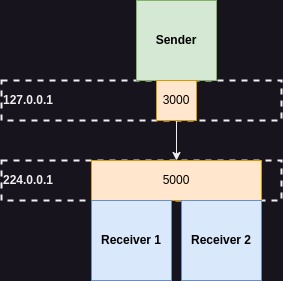
The simplest scenario assumes 1 sender sending from 127.0.0.1:3000 address to 2 receivers listening on the shared 224.0.0.1:5000 multicast address:
To achieve that, run as many receivers as you want with command:
python3 receiver.py -mc_address 224.0.0.1:5000
And the sender with command:
python3 sender.py -sender_address 127.0.0.1:3000 -mc_address 224.0.0.1:5000
Note for beginners: multicast IPs can range from 224.0.0.0 to 239.255.255.255.
Multicast on a single IP and multiple ports
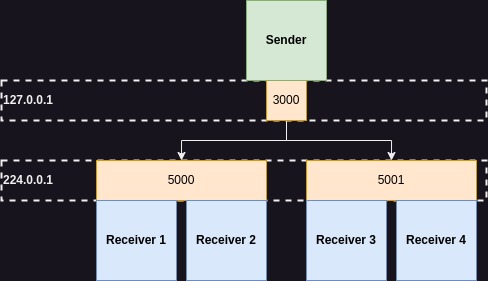
In this setup 1 sender sends message from 127.0.0.1:3000 address to a single multicast IP and two multicast ports: 224.0.0.1:5000 and 224.0.0.1:5001.
Run first group of receivers with command:
python3 receiver.py -mc_address 224.0.0.1:5000
And the second group of receivers with command:
python3 receiver.py -mc_address 224.0.0.1:5001
After that you can send a multicast messages to all of them running sender with the following command:
python3 sender.py -sender_address 127.0.0.1:3000 -mc_address 224.0.0.1:5000 224.0.0.1:5001
Multicast on multiple IPs
Groups of receivers can be of course differentiated also by multicast IP.
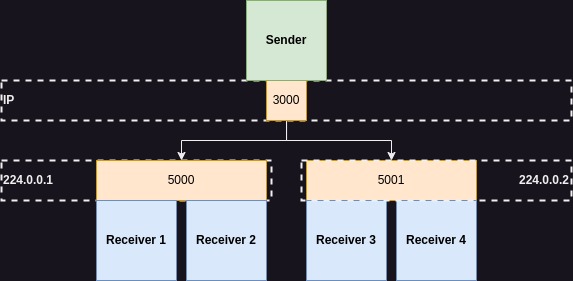
Note for beginners: in this example I decided to not specify the sender's IP. In the previous examples, I used loopback interface on which 127.0.0.1 IP is always available, but multiple multicast IPs on that interface may not work on your machine without additional configuration. I don't know what are real network interfaces available on your machine and what IPs are assigned on them, so I let the operating system choose it automatically by leaving the sender's IP empty.
For that, run the first group of receivers with command:
python3 receiver.py -mc_address 224.0.0.1:5000
And the second group of receivers with command:
python3 receiver.py -mc_address 224.0.0.2:5000
Now the only thing left to do is to launch the multicast sender (leaving the IP empty - see the note above):
python3 sender.py -sender_address :3000 -mc_address 224.0.0.1:5000 224.0.0.2:5000


